
From someone's rack to your track.
Members capture the gear and chains they own. Our engine learns how each one sounds and behaves, knobs included, and measures how close it gets. You load it in the plugin, in any DAW, in seconds.
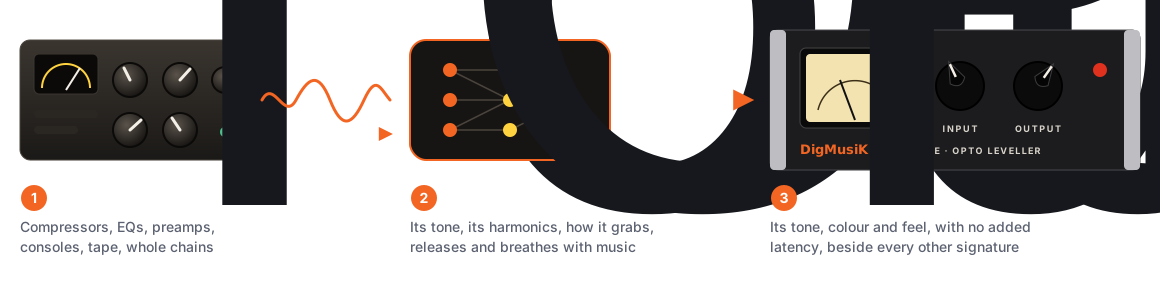
Capture
Play our test sounds through a piece of gear and record what comes back, at one setting or with its knobs. That's all a capture is.
Signature
What our engine learns from a capture: that unit's sound and controls, with its accuracy measured and shown.
Chain
Units in a row with their settings, hardware and Originals together, saved and shared in one click.
Find it, load it, shape it
Find it
Open the DigMusiK plugin on any track and browse members' hardware, chains and settings, and the DigMusiK Originals. Hear anything on your own audio on our website first.
Load it
One click. Single units and whole chains run inside the one plugin, with no added latency at 48 kHz.
Shape it
Turn each unit's own controls, use Drive, Tone, Mix and Output, Morph between two settings with Motion, mid/side and Split Blend, then save and share what you made.
Three ways in, one queue
Standalone DigMusiK
The plugin running on its own, no DAW needed. Choose your interface, the output wired to your unit and the input it returns on: the signal plays on that output only, never your monitors. Check levels with a quiet test tone, then press Record.
The DigMusiK plugin
The same capture assistant, from inside your DAW. It records at your session's sample rate and never changes it. (On Windows, if your DAW holds the interface exclusively, use standalone DigMusiK.)
Your DAW, then upload
Download our reference signal, play it through your gear in your DAW, record the return and upload the WAV on our website.
- One setting or working controls. A one-setting capture takes about five minutes. For working controls, the assistant then asks for short passes at the settings it chooses ("Set Attack to 3, Ratio to 8"), about 30 to 60 minutes in all.
- Any session rate. Captures record at whatever rate your interface is already using (44.1, 48, 88.2 or 96 kHz). DigMusiK never switches it, so your other sessions aren't disturbed.
- Checked as it arrives. Silence, clipping, timing and level problems are explained in plain English, with what to change.
- Then it's queued. Your capture is learned on our GPUs while you get on with your day. You'll see its place in the queue and roughly how long it will take, and we email you when it's in the queue and again when it's ready. You don't need to keep anything open.
What the engine learns
- Tone and harmonics: a waveform network learns the unit's frequency response, saturation and how its colour changes with level.
- Dynamics: a second path follows the music's level over milliseconds to seconds, so compressors, limiters and levelling amps keep their attack, release, memory and feel.
- Controls: for a unit captured with working controls, the knob positions are inputs to the model, so it learns how each control changes the sound, including between the settings you recorded.
- Dial correction: real dials are hard to set exactly. The engine works out where each dial really was from the sound itself and corrects small differences.
How we measure accuracy
Part of every capture is held back and never trained on. The finished signature is scored on that held-back audio, and on settings it didn't train on, at its worst setting rather than its average.
| Rating | Error to signal |
|---|---|
| Excellent | under 1% |
| Great | under 3% |
| Good | under 6% |
| Fair | under 15% |
We also publish the level error in decibels, which shows how closely compression is followed. Only signatures rated Good or better can be published to everyone.
Mix every kind of sound in one chain
One plugin holds up to eight units of any kind, in any order: members' hardware signatures, the DigMusiK Originals, creators' plugins, Print Recall twins and NAM captures. Morph, Motion, mid/side, Split Blend, level match and the safety limiter work across the whole chain.
For example: a NAM capture of a guitar preamp, then a member's captured opto compressor with its working controls, then the Spoolhaus tape Original.
NAM captures
NAM captures (.nam files) are made with the open-source Neural Amp Modeler. Load any you have from your computer: they stay private to you, and you only upload one if you choose to, for your mix deliveries and shared sessions.
- Each is one fixed setting of the gear, so it has no working knobs of its own
- DigMusiK gives it Input, Drive, Tone, Mix and Output, and Full or Lite for A2 captures that offer both
- Plays A1, A2 and LSTM captures, at any session rate
- Credited to its author and the Neural Amp Modeler project wherever it appears
- Can't be published or sold on DigMusiK, and can't be a Print Recall target
Built for real sessions
- No added latency at 48 kHz; at other rates the small delay is reported to your DAW, so everything stays aligned
- Chains of up to eight units, each with its own controls, saved with your session
- Morph, Motion, mid/side, Split Blend and level match on every signature and chain
- A safety limiter on the output, so a hot chain can't hurt your ears or speakers
- Every value visible and exact: Shift-drag for fine control, double-click to type, Alt/Option-click to reset
- A sidechain input with key filters and Key Listen: Mortar follows a key today, and the other compressors are being tuned for it
- Match: bring a track towards a reference, in the plugin or on the website (Studio and Pro)
- Archive: turn a chain of plugins into a private signature, so old sessions keep playing
- Print Recall in the session: a DigMusiK before your hardware insert and one after it record the dry track and the print, with nothing to export, and the re-dial guide gets the unit back to those settings
- Before any test signal plays, DigMusiK asks you to turn your volume down, waits, warns again and counts down
What it can't do (yet)
We'd rather tell you now than in a review.
- Reverb and delay tails longer than about a second are shortened (for space, add Platen, Parlour, Cellar or Pinchroll to the chain)
- Movement from an internal LFO or clock (chorus, flanger, rotary speaker, tape wow) isn't reproduced; the tone is (Doublet, Contrail and Waver add it back)
- Noise that doesn't follow the input (hum, hiss) isn't captured, so signatures are cleaner than the unit
Protected by design
Signatures and the DigMusiK plugins only run inside DigMusiK, on devices signed in to an account that's allowed to use them. Each is encrypted and licensed to the device, renewed now and then while you're online, and opened only in memory while it plays, so creators' work and ours can't simply be copied and passed around. The DigMusiK plugins are free for every registered member and licensed the same way.